
How to Delete Your Stella Sora Account Permanently
A comprehensive guide to removing your Stella Sora gaming account and understanding the consequences
Important: Account deletion is permanent and cannot be undone. All your game progress, items, and data will be lost forever.
Stella Sora is an immersive gaming experience that many players enjoy, but sometimes you may need to delete your account for various reasons. Whether you're taking a break from gaming, concerned about privacy, or simply want to start fresh, this guide will walk you through the complete account deletion process.
What Happens When You Delete Your Stella Sora Account?
- All game progress and achievements will be permanently erased
- Purchased items and virtual currency will be lost
- Your player profile and friends list will be deleted
- You won't be able to recover the account later
- Any linked social media accounts will be disconnected
Step-by-Step Guide to Delete Stella Sora Account
Access Settings Menu
Launch the Stella Sora game on your device and locate the settings menu.

The settings icon is typically found in the top right corner of the main screen, represented by a gear icon or three horizontal lines.
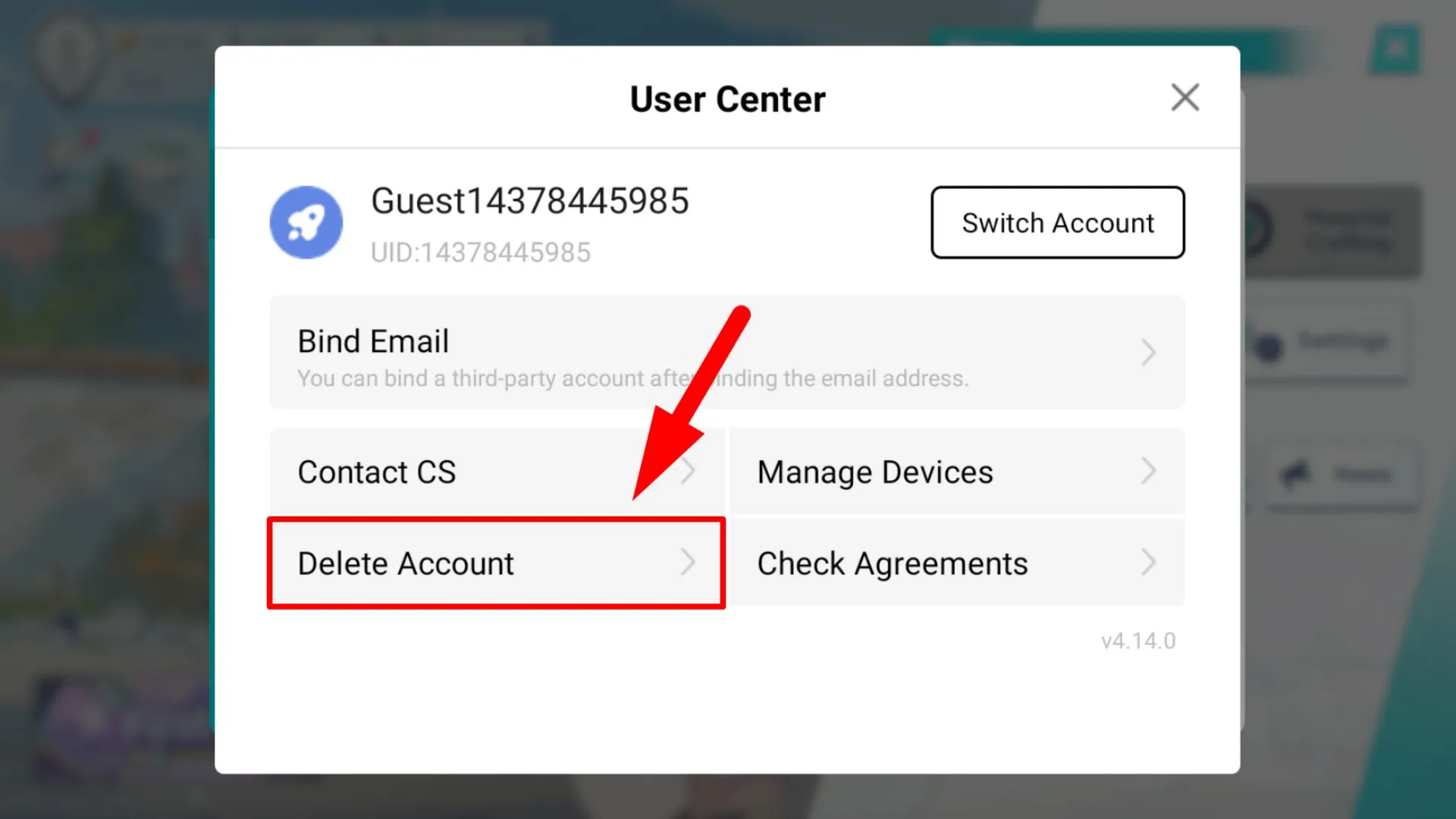
Navigate to User Center
Find and select the User Center option within the settings menu.
The User Center contains account management options including privacy settings and deletion tools.
Select Delete Account Option
Choose the account deletion option from the available menu items.

This option may be located under "Account Management" or "Privacy Settings" depending on your game version.
Read Deletion Information
Carefully review the account deletion consequences and warnings.
The game will display important information about what data will be lost permanently. You may need to check a confirmation box.
Type DELETE Confirmation
Enter the required confirmation text to proceed with deletion.
You must type "DELETE" in all capital letters exactly as shown. This is a security measure to prevent accidental deletions.
Finalize Account Deletion
Complete the deletion process by confirming your choice.
Tap "Next", "Confirm", or "Delete Account" to permanently remove your Stella Sora account from the system.
Video Guide: Stella Sora Account Deletion Process
Watch this visual guide that walks you through the complete Stella Sora account deletion process from start to finish.
Alternative Methods to Delete Stella Sora Account
Via Website Portal
If you can't access the game, you may be able to delete your account through the official Stella Sora website:
- Visit the Stella Sora official website
- Log into your account
- Navigate to Account Settings
- Find the deletion option and follow prompts
Contact Customer Support
If you're experiencing issues with the standard deletion process:
- Email [email protected]
- Include your username and reason for deletion
- Provide verification if requested
- Allow 3-5 business days for processing
Frequently Asked Questions About Stella Sora Account Deletion
Can I recover my Stella Sora account after deletion?
No, account deletion is permanent and irreversible. Once you confirm deletion, all your data is permanently erased from Stella Sora's servers and cannot be recovered.
What happens to my in-game purchases when I delete my account?
All purchased items, virtual currency, and premium content will be lost permanently. Stella Sora does not provide refunds for purchases made before account deletion.
How long does it take for my Stella Sora account to be completely deleted?
The deletion process is typically immediate, but it may take up to 30 days for all your data to be completely removed from backup systems and logs.
Can I temporarily deactivate my Stella Sora account instead?
Stella Sora currently only offers permanent account deletion. There is no option for temporary deactivation or account freezing.
Considerations Before Deleting Your Stella Sora Account
- Backup important data: If you have screenshots, videos, or memorable game moments, save them before deletion
- Unlink connected accounts: Disconnect any social media or payment accounts linked to your Stella Sora account
- Consider a break: If you're unsure about permanent deletion, simply uninstall the app and take a break instead
- Check subscription status: Cancel any active subscriptions before deleting your account to avoid continued billing
- Inform friends: Let your in-game friends know you're leaving if you have established relationships
Successfully Delete Your Stella Sora Account
Following this comprehensive guide will help you permanently delete your Stella Sora account. Remember that this action is irreversible, so be absolutely certain before proceeding. If you encounter any issues during the deletion process, don't hesitate to contact Stella Sora customer support for assistance.
Note: This guide is updated for the current version of Stella Sora. The exact steps may vary slightly depending on future updates to the game interface.